Invoice · Receipt · Estimate
Receipt Generator
- Free
- No sign up
- No watermark
- Instant PDF
This free receipt maker creates a clean PDF receipt of payment — with the method, the date and a PAID mark. No signup, no watermark, and it converts to or from an invoice in one click.
Free mode keeps your invoice data in your browser — no account, no server copy. Only the optional Pro archive, if you buy it and turn it on, stores the documents you save on our server.
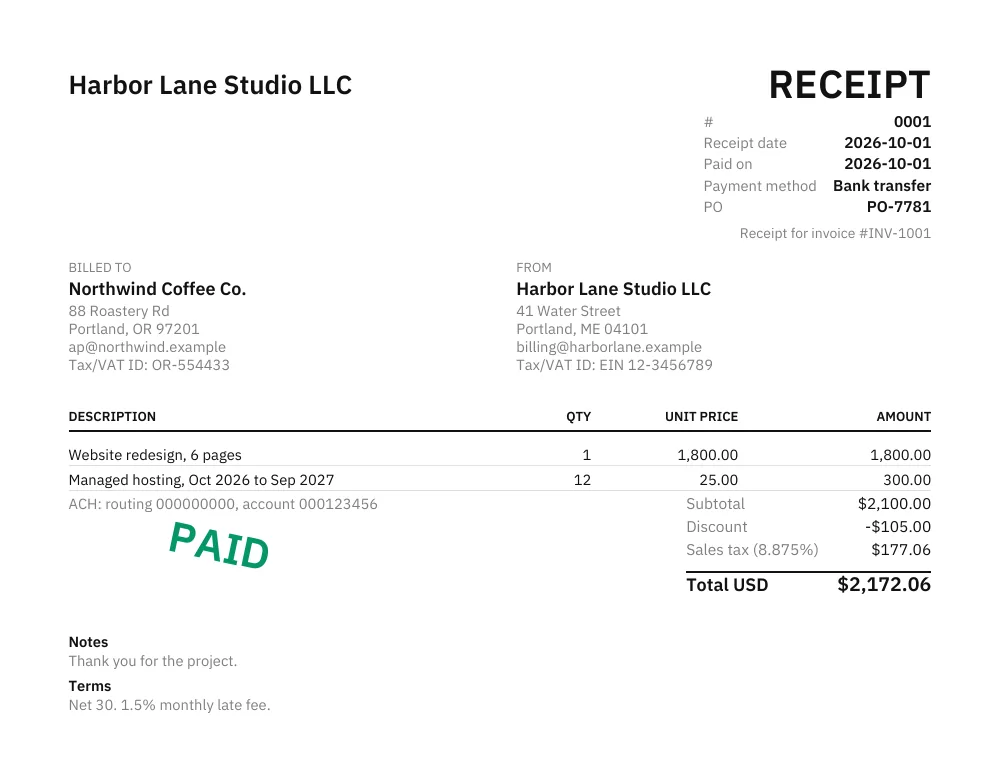
A receipt converted from a paid invoice
What carried over, and what changed:
- “Receipt for invoice #INV-1001” under the header, tying it to the invoice
- The same client, line items, discount, tax and total as the invoice — nothing retyped
- A receipt number of its own, the receipt date, the date paid and the payment method (Bank transfer)
- A PAID mark; the invoice’s “Pay online” link and QR code are not printed on the receipt
How to make a receipt in under a minute
- Fill in who is issuing the receipt and who paid — or click Fill with sample data to see the finished layout first.
- Add a line for what was paid for, then set the amount, the payment method and the date paid. The totals calculate as you type.
- Download the PDF. The document carries a receipt number, the payment method, the date, and a PAID mark.
That is the whole of how to make a receipt here: no account, no template file to download and repair, and no limit on how many you make.
A free receipt maker instead of a file to download
Most results for receipt template give you a Word or Excel file: download it, open it in another program, fight the table borders, then export a PDF. This free receipt maker skips all of that. You type into the page, the preview updates beside you, and the finished receipt downloads as a clean PDF with no watermark and no branding but your own.
Receipts templates for the usual situations
- Rent — a rent receipt template with the tenant, property and the period the payment covers.
- Cash — a cash receipt template for money handed over with no bank record behind it.
- Donation — a donation receipt template for a gift to an organisation.
- Everything else — deposits, services, sales and refunds all fit the general receipt on this page.
What a receipt of payment has to show
Whatever the layout, a receipt for payment is only useful if it answers five questions months later: who paid, who received it, how much, when, and what for. Add how it was paid — cash, card, bank transfer — and a receipt number, and the document stands on its own without anyone having to remember the transaction.
Online receipt, digital receipt, printed receipt
They are the same file here. The online receipt you build in this page downloads as a standard PDF: email it and it is a digital receipt; open it and press print and it is a paper receipt. Nothing about the document changes between the two, and the PAID mark, method and date travel with it either way.
Invoice first, receipt after
An invoice asks for money; a receipt confirms it arrived. If you already billed the client, convert the paid invoice into a receipt in one click — the line items and totals carry over and the original invoice stays saved as a draft. Quoting a job before any of that? Start from the estimate generator.
How it works
- Fill in your details, your client, and the line items — sample data is one click away.
- Pick a currency, tax mode, and template; everything previews live as you type.
- Download a clean PDF or print it. Your data is saved only on this device.
Frequently asked questions
Is this receipt generator free?
Yes — free, no signup, no watermark, and no limit. Create as many receipts as you need.
Is it a receipt maker, receipt creator or receipt generator?
They are the same thing — receipt maker, receipt creator and receipt generator all describe this free tool. Fill in the details and download a PDF receipt, with no signup and no watermark.
How is a receipt different from an invoice?
An invoice asks for payment; a receipt confirms it was paid. A receipt shows the payment method and date and marks the document PAID.
Can I turn a paid invoice into a receipt?
Yes. If you started from an invoice, one click converts it to a receipt with the amount marked as paid — and your original invoice stays saved as a draft.
What is a receipt of payment?
A receipt of payment — also written receipt for payment — is the document the person who was paid gives to the person who paid. It states who paid, how much, when, what it was for and how the money moved, and it marks the amount as settled. That is exactly what this generator produces: a PDF receipt of payment stamped PAID, with the method and the date on it.
Do you have receipt templates for different situations?
Yes. The same editor backs a set of receipts templates: rent, cash and donation each have their own page with the wording and fields that situation needs, and every other case — a deposit, a service, a sale — is covered by the general receipt on this page.
Where is my data stored?
Only in your browser. There is no server and no copy of your receipts anywhere. The one exception is the optional, paid Pro archive: if you buy it and turn it on, the documents you save are also stored on our server so they sync across devices.
How do I make a receipt online?
Fill in the payer, the amount, the payment method and the date, then download the PDF. Making a receipt online with this tool takes under a minute, needs no signup, and the receipt data never leaves your browser.
Can I print the receipt, or send it as a digital receipt?
Both. Download the PDF to print a paper receipt, or email the same file as a digital receipt. A digital receipt carries the same PAID mark, payment method and date as the printed one.